
The NightOwling app
One app for
life on nights.
Tools, guidance and everyday support for sleep, energy, food and life around your shifts.
Launching soon.

Watch the app preview
Example account · Free and Premium features
The full picture
The whole app,
at a glance.
Jump straight to a section, or browse the full feature list.
Compare Free and Premium
Explore all featuresPlanning, scanning, light, connections and everyday support.
01Your day, your rhythmToday · Atlas · changing schedules
- My Shift Life: your rotation, commute, commitments and preferences.
- Today and My day changed for the day in front of you.
- Atlas dial and timeline, with Rhythm and Alertness views.
- Days-off Flip Plan: compare staying on nights, a partial change or a full switch.
- Saved scenarios, plan comparisons, source details and trends.
02Six tools to think it throughSleep · caffeine · meals · light · chronotype
- Caffeine Explorer.
- Sleep Schedule Builder.
- Meal & Packing Builder.
- Light Planner.
- Sleep Shortfall.
- Chronotype Quiz.
03Log it. Scan it. See the context.Sleep · drinks · food · light · how you feel
- Quick sleep, caffeine, meal and light logs.
- Barcode lookup for packaged food and drinks.
- Ingredients, portions, saved recipes and meal preparation.
- Camera or sensor light capture, photopic lux and modeled melanopic EDI.
- Sleep, energy and mood check-ins, with longer history in Premium.
04Bring your context with youDevices · calendars · ChatGPT · Claude · Gemini
- Apple Health on iPhone and Health Connect on Android.
- Phone and watch records through those health services, with your chosen permissions.
- Detailed timing imports for supported activity and heart-rate context.
- Calendar files, iCalendar subscriptions and the iPhone app’s Apple Calendar connection.
- Review imports, resolve schedule conflicts and manage connected sources.
- Connect NightOwling with ChatGPT, Claude, Gemini or another compatible AI assistant to use your tools and chosen context in conversation.
05Learn. Discover. Try it.For You · Flip · courses · Essentials
- Short videos, tips, guides, reports and courses.
- For You discovery and the swipeable Flip learning feed.
- Saved ideas to return to and available workshops.
- Essentials browsing, product comparisons and My List.
- Keep track of solutions you own and habits you already use.
06The life around the shiftSharing · reminders · privacy · support
- Share my week: preview selected work and quiet times, then create, extend or stop a link.
- Wellness reminders, wind-down timing, quiet windows and pause controls.
- Check-ins and a look back at your patterns.
- Help, account controls and data export or deletion requests.
- Manage your individual plan or workplace access.
Your day, connected
The next step.
And the bigger picture.
A shift changes more than bedtime. See what is happening today and how it fits into your week.
Start with what
matters now.
Your next shift, your sleep and a useful next step, together. Log what happened and adjust a particular day when life changes.

See how the
pieces fit together.
Bring shifts, sleep, light, caffeine and meals into a dial or timeline. Open an event to understand the detail behind it.

Actual app screens with example data. Rhythm, caffeine and light outputs are estimates. Premium adds personalized daily planning and advanced Atlas views.
The science is there.
You can look inside.
Explore your estimated rhythm, switch to an alertness view, and see sleep, work, caffeine, meals and light alongside it. Open the detail to understand what shaped the picture.
Your shifts, sleep and daily records sit together, alongside activity and heart-rate history from connected health services.
Compare possibilities, save a scenario and revisit it as your week changes. A planned routine stays distinct from what you actually logged.
How do the estimates work?
Body-clock timing. Atlas includes the Forger, Jewett and Kronauer circadian model to explore how your internal rhythm develops over time.
Sleep pressure and caffeine. Sleep pressure builds across wakefulness and falls during sleep. Caffeine has its own decay curve and contributes to the alertness estimate. Meal logs add context alongside these calculations.
Circadian light. CIE-derived light calculations combine estimated lux, source type and colour temperature to produce modeled melanopic EDI.
Open the source details to see the method in use and the timing, coverage and freshness of the records behind it.
Days off
change the plan.
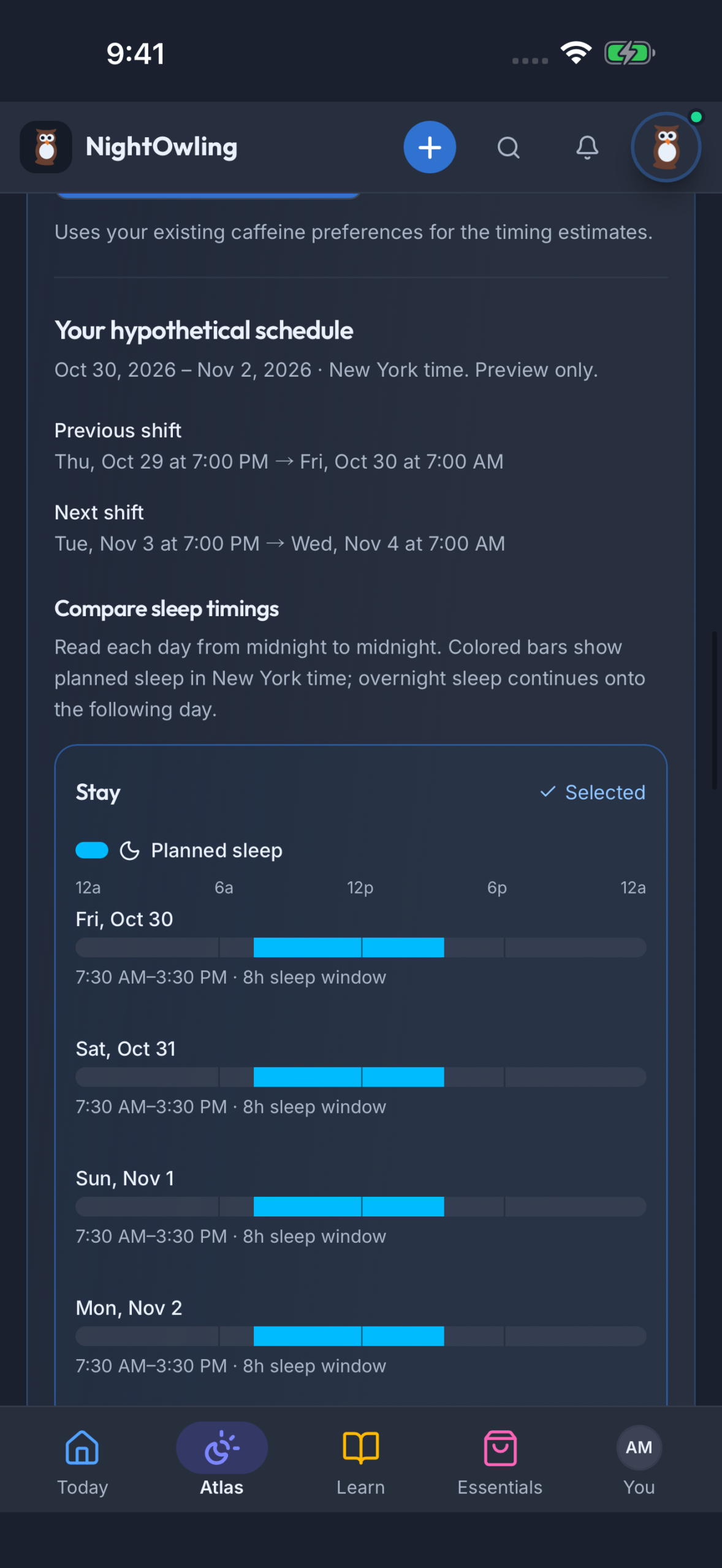
Compare staying on nights, shifting partway or switching fully around your actual dates. Bring your next shift and commitments into the decision, then save the approach you want to revisit.
This is the days-off Flip Plan. Flip in Learn is the separate short-learning feed.
Explore before you change
A different coffee.
A different bedtime.
A different kind of week.
Try the “what if?” before you change your routine.
Work through everyday choices around the shift you actually work. Compare options, then choose what to save or apply.
Caffeine Explorer
Explore drink amounts, timing and estimated caffeine remaining at your planned sleep.
Sleep Schedule Builder
Find a sleep window around your shift, commute and the time you need to get ready.
Meal & Packing Builder
Build meals around your preferences, facilities and shifts. Reuse recipes and packing plans.
Light Planner
Explore brighter and dimmer times around work, travel and intended sleep.
Sleep Shortfall
Look at your sleep opportunity across a typical week and explore where more room could help.
Chronotype Quiz
Explore your morning or evening tendency and how it relates to the hours you work.
A different coffee routine.
A result you can compare.
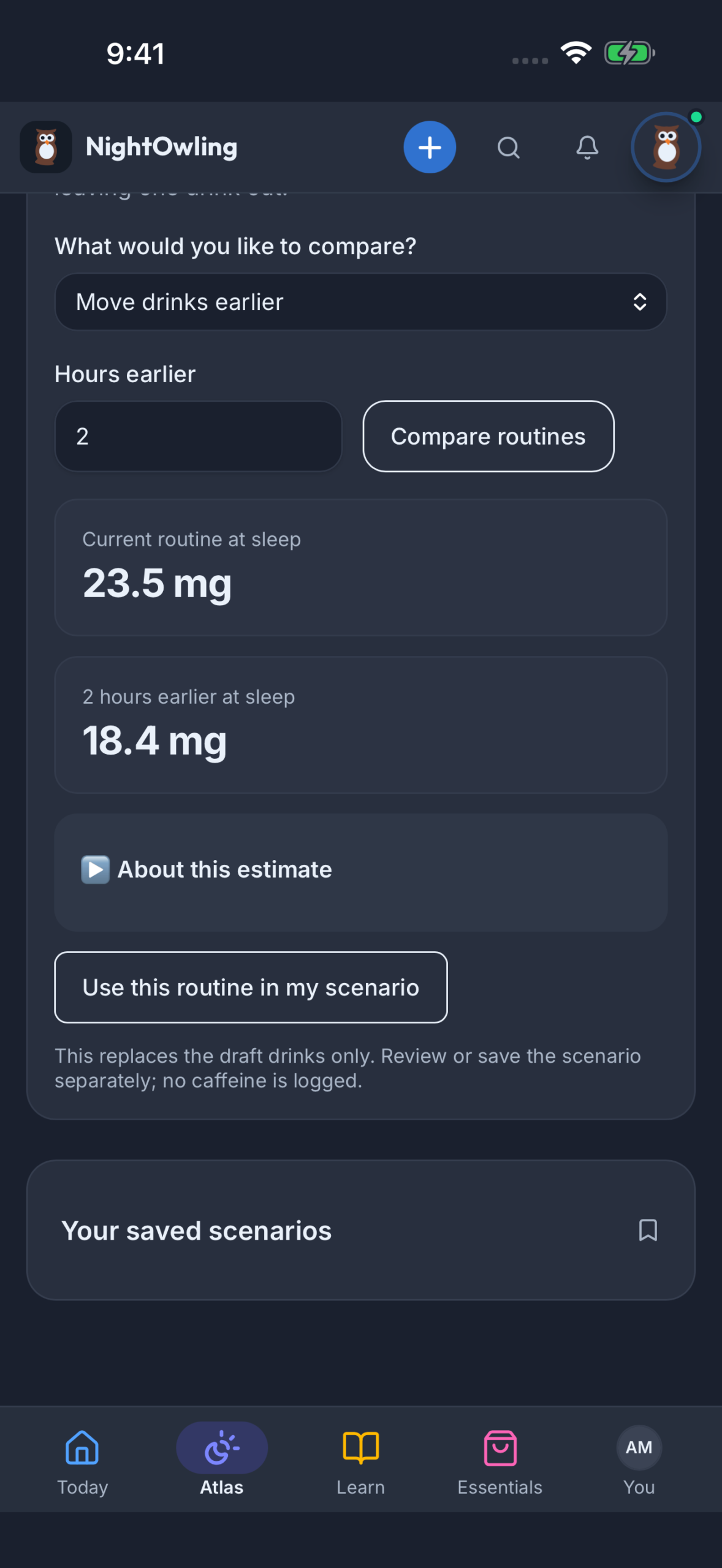
Explore moving drinks earlier or changing a routine. Compare the estimated caffeine remaining at planned sleep, then keep the scenario you want to revisit.
Get several shifts
ready at once.
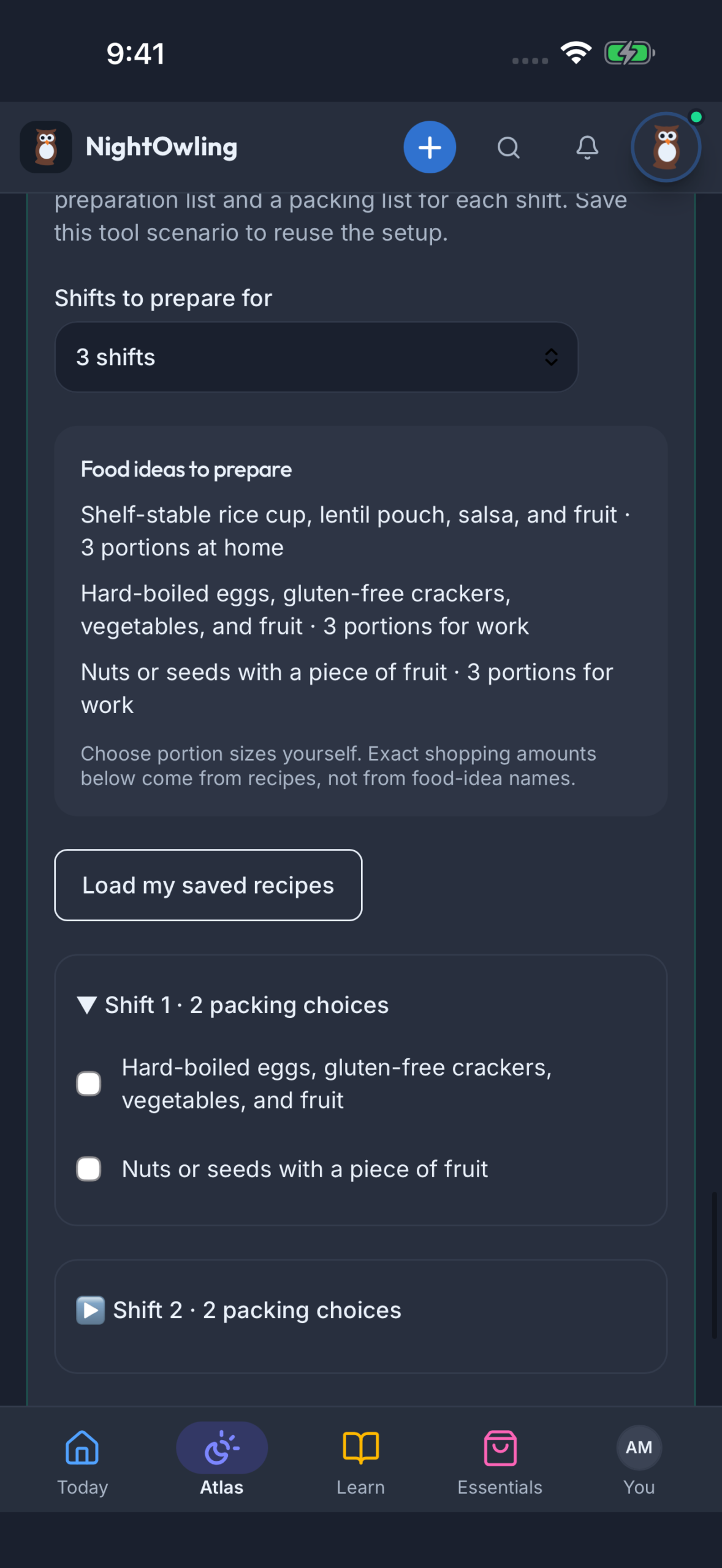
Reuse saved recipes, prepare a shopping and food-preparation list, and build a packing checklist for each shift. Keep the setup for next time.
Free includes starting results. Premium adds supported comparisons, saved routines and deeper planning.
Website tool inputs do not carry over into the app.
Capture and connect
Less typing.
More of your day.
Use your phone to bring the drink, the meal and the light around you into the picture.
Scan the package.
Make the record yours.
Look up a packaged drink or food, check the serving, then add it to your day. You can also build meals from everyday ingredients and reuse your own recipes.
Scan a barcode to look up a packaged food or drink.
Confirm the portion, nutrition or caffeine information and fill in what is missing.
Log when you ate or drank it. Keep future meals as plans until they happen.
Get to know
your light.
Capture a camera or phone-sensor estimate, review the source and save the reading. The white-paper method helps you check the light where your eyes actually are.
- Photopic lux
- An estimate of visible-light illuminance: how much light reaches the surface you are checking.
- Melanopic EDI
- Modeled circadian-light context using the light source and colour temperature.
Supported iPhone cameras can estimate colour temperature. You can also enter it from a known source or meter. Melanopic EDI is modeled, not a direct spectral measurement. Save a snapshot, or confirm the time spent in comparable light to record an exposure interval.
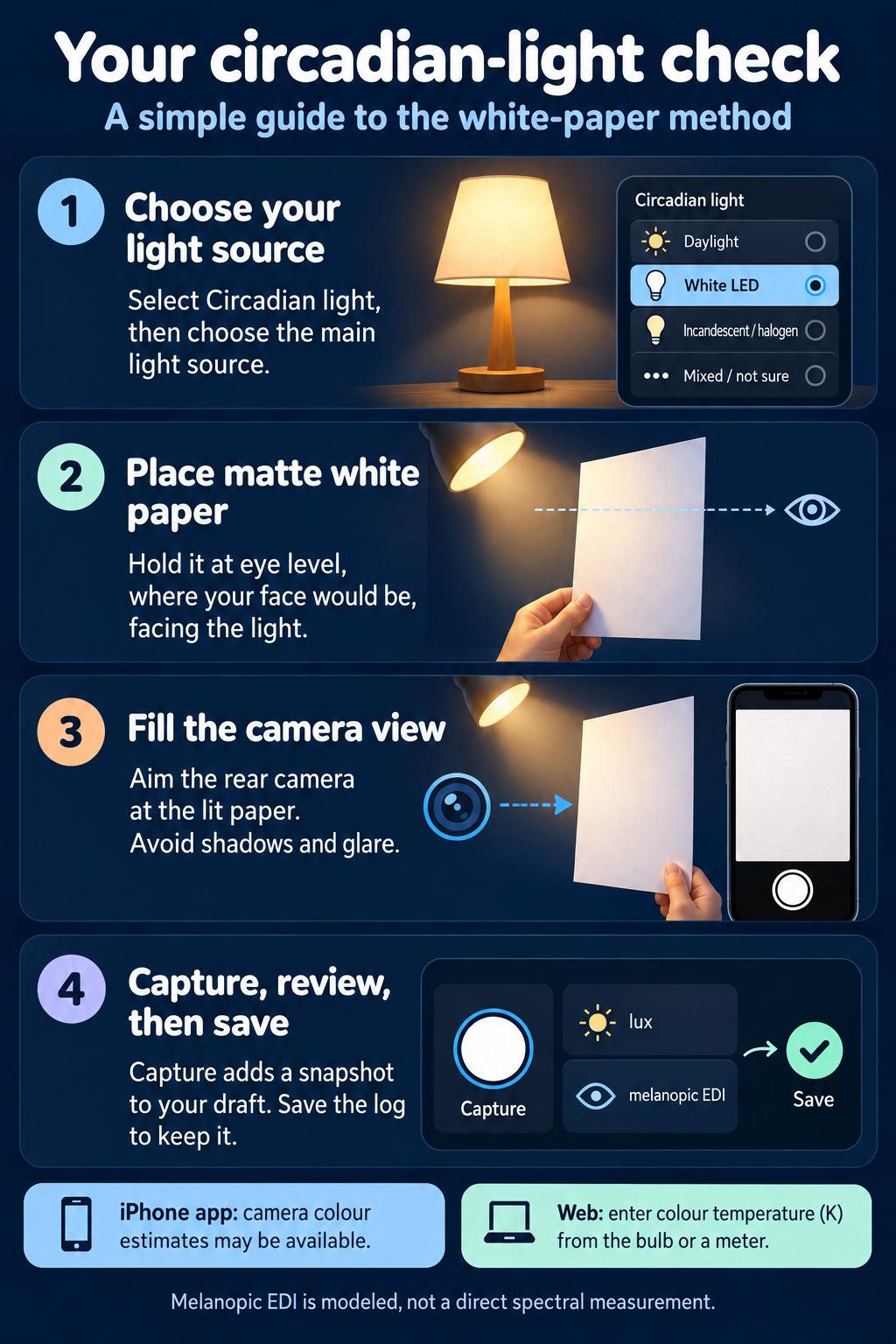 See the light-check guideThe illustrated guide inside NightOwling.
Open full guide Your records.
Connected to your plan.
Premium connects to Apple Health on iPhone and Health Connect on Android. Bring permitted sleep, activity and heart-rate records into view, including watch records that reach those services. You choose which data to share.
See timed activity and heart-rate records alongside your plan. Check each source and when it last synced.
Bring the schedule
you already have.
Import a calendar file, subscribe to an iCalendar feed or use the iPhone app’s Apple Calendar connection. Review the shifts and resolve conflicts before bringing changes into your schedule.
Use My day changed for a particular date when a shift runs late or your plans move.
Health connections require the mobile app. Available records and capture methods depend on the device and permissions.
More about device connectionsOne useful idea.
Whenever you have
a moment.
Short videos, tips, guides and courses. Discover ideas in For You, swipe through one at a time in Flip, and save what helps for later.
Explore the Learning Hub
Starter learning with Basic. The full available course library with Premium.
Your space.
Your budget.
Your night-shift setup.
Compare options for darkness, noise, comfort and meals. Keep My List, and count the solutions you already use.
Explore Essentials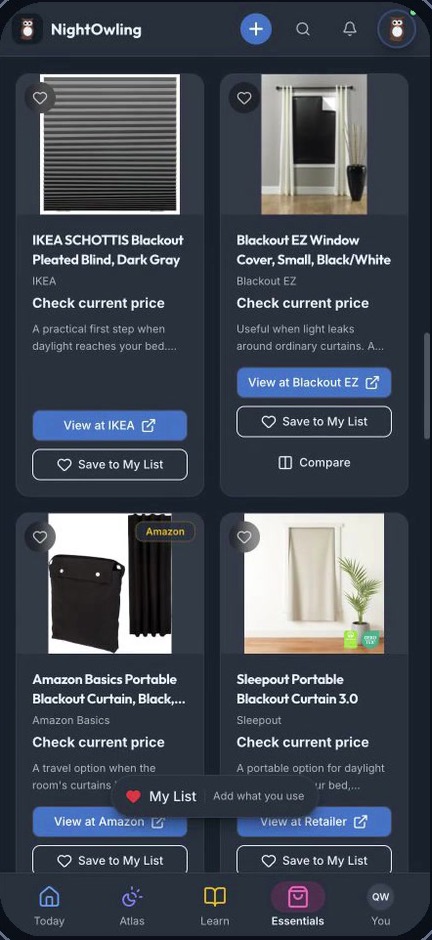
Product purchases are separate from app access.
Help home
understand your week.
Choose the work and quiet times you want to show, preview them, then share a link with someone at home. Extend or stop the link when you choose.
How sharing worksAnyone with the link can view its selected schedule.
Notice how you feel.
Keep what helps.
Look back at sleep, energy and mood. Choose your reminders and quiet hours, from winding down to a weekly check-in.
Your favorite AI.
Connected to NightOwling.
ChatGPT, Claude, Gemini or another compatible AI assistant. Bring NightOwling’s tools and the context you choose into your conversations. Ask questions, compare plans and explore changes around your shifts.
How AI connections work NightOwling tools
Choose your starting point
Useful from the start.
More personal with Premium.
Start free. Add deeper planning and connected support when you want it.
Free · Basic
The everyday starting point.
$0
No paid subscription required.
- Manual sleep, light, caffeine and meal logs
- Basic Atlas chart and timing guidance
- Basic results across six planning tools
- Recent sleep, energy and mood check-ins
- Starter learning and resources
- Essentials browsing and My List
Premium
A plan that connects the dots.
$8.99/ month
Or $79.99 billed yearly, about $6.67 per month.
- Everything in Basic
- Advanced Atlas and personalized daily planning
- Days-off planning, saved routines and supported comparisons
- Barcode lookups and light capture
- Longer history and the full available course library
- Health imports in the mobile app, with your permission
Prices are in USD for new individual subscriptions. Premium renews unless canceled. The yearly plan is billed $79.99 once a year, not monthly. Local prices and taxes may vary; review the price and terms at checkout. Existing subscribers keep their current terms. Public registration is not open yet.
Workplace access
Joining through
your workplace?
Use your organization’s invitation to join. Check what your program includes before buying an individual subscription.
Before you get started
Good questions.
Clear answers.
Access, devices, plans and the choices you control.
Ask the NightOwling teamWho is NightOwling for?
NightOwling is the app for people who work nights, rotating or irregular shifts: starting your first nights, years into them, or moving between shifts and days off. It's built around the hours you actually work and the life around them, including family, care and appointments.
What does NightOwling actually help me with?
More than sleep. Plan when to sleep, eat and have caffeine around your shifts, log what happened, and see it together in the Circadian Atlas. You can also find options for a darker, quieter sleep space, pick up tips from short videos and guides, and show people at home when you're working or sleeping.
Do I need a wearable?
No. You can start with your shift schedule and quick manual logs for sleep, caffeine, meals and light, and the basic planning tools work without any device. If you already use a phone or watch that records health data, Premium can bring supported records in later, with your permission.
Does it work with Apple Health, Health Connect or my watch?
With Premium, the supported iPhone app can import permitted records from Apple Health, and the Android app from Health Connect. A watch works only if its data reaches those services, so not every device or metric is guaranteed. Connections don't work in a web browser, and you choose which data types to allow.
What's free, and what does Premium cost?
Basic is free: manual logs, the basic Atlas chart, basic results from all six planning tools and starter learning. Premium adds personalized planning, days-off comparisons, saved routines, longer history, the full learning library and supported health connections. It's US$8.99 monthly, or US$79.99 billed once a year (about $6.67 a month); it renews unless canceled. Local prices and taxes may vary; review the price and terms at checkout.
What if my shifts rotate, change or run late?
NightOwling supports regular, rotating and changing schedules. Add your actual shifts, then where offered, use My day changed to update one date, like a late finish or extra shift, without rewriting your usual pattern. Guidance follows the schedule you give, so check it when your week changes. Premium adds days-off comparisons.
How does NightOwling work out its suggestions?
It draws on published circadian and sleep research and the information you add: shifts, sleep, caffeine, meals, light and any permitted health data. Rhythm, caffeine and light results are estimates, not body measurements, and depend on the quality and amount of data. The Atlas shows what each estimate is based on.
Is NightOwling medical advice?
No. NightOwling supports general wellness and planning. It isn't a medical device, doesn't diagnose or treat conditions, and can't tell you whether you're safe to drive or work. Follow your workplace fatigue procedures, and if tiredness or sleep problems persist or affect your safety, talk to a qualified health professional.
Who can see my data? Can my employer?
For workplace accounts, eligible employer health views use group summaries under privacy thresholds rather than unrestricted personal logs. Other profile, schedule or program information may be visible to the organization. You choose which optional connections and sharing features to use. Read the NightOwling privacy policy for the details that apply to your account. Read the privacy policy.
Can I share my schedule with people at home?
Yes. Share my week lets you pick the dates and what to show, preview it, then send a link so a partner or housemate can see when you're working or need quiet time. Anyone with the link can view it, so share it carefully. You can extend or stop the link later.
My workplace offers NightOwling. How does that work?
Use the invitation from your organization to join. What's included depends on your workplace's program, so check You > Plan and billing before buying an individual subscription; you may already have the access you need. Workplace benefits can differ from individual Premium.
Is there an iPhone or Android app, and when can anyone sign up?
Right now, new accounts need an invitation or eligible workplace access, and invited users can use the web app in a phone or computer browser. Public signup opens when NightOwling launches. App Store and Google Play links will appear here once the apps are publicly available; health connections need the mobile app.
Can I use NightOwling with ChatGPT, Claude or Gemini?
NightOwling connects your planning tools and chosen context with the AI assistant you use. Ask about your shifts, compare sleep or caffeine scenarios, and work through options in conversation. With your permission, supported updates can be saved back to NightOwling.
AI connections are in private preview. ChatGPT and Claude connections have been tested; Gemini access is not enabled yet. Other AI assistants need a compatible connection.
You choose what a connection can access and can revoke it in NightOwling. Manage information already shared in the AI service’s own chat history and privacy settings.
Make room for your kind of day
Your shifts.
The rest of your life.
Get the news when NightOwling opens to everyone.
"*" indicates required fields